Sacred — Concepts & Guide
Sacred — quick concepts
Illustration: from original Python script to Sacred integration:
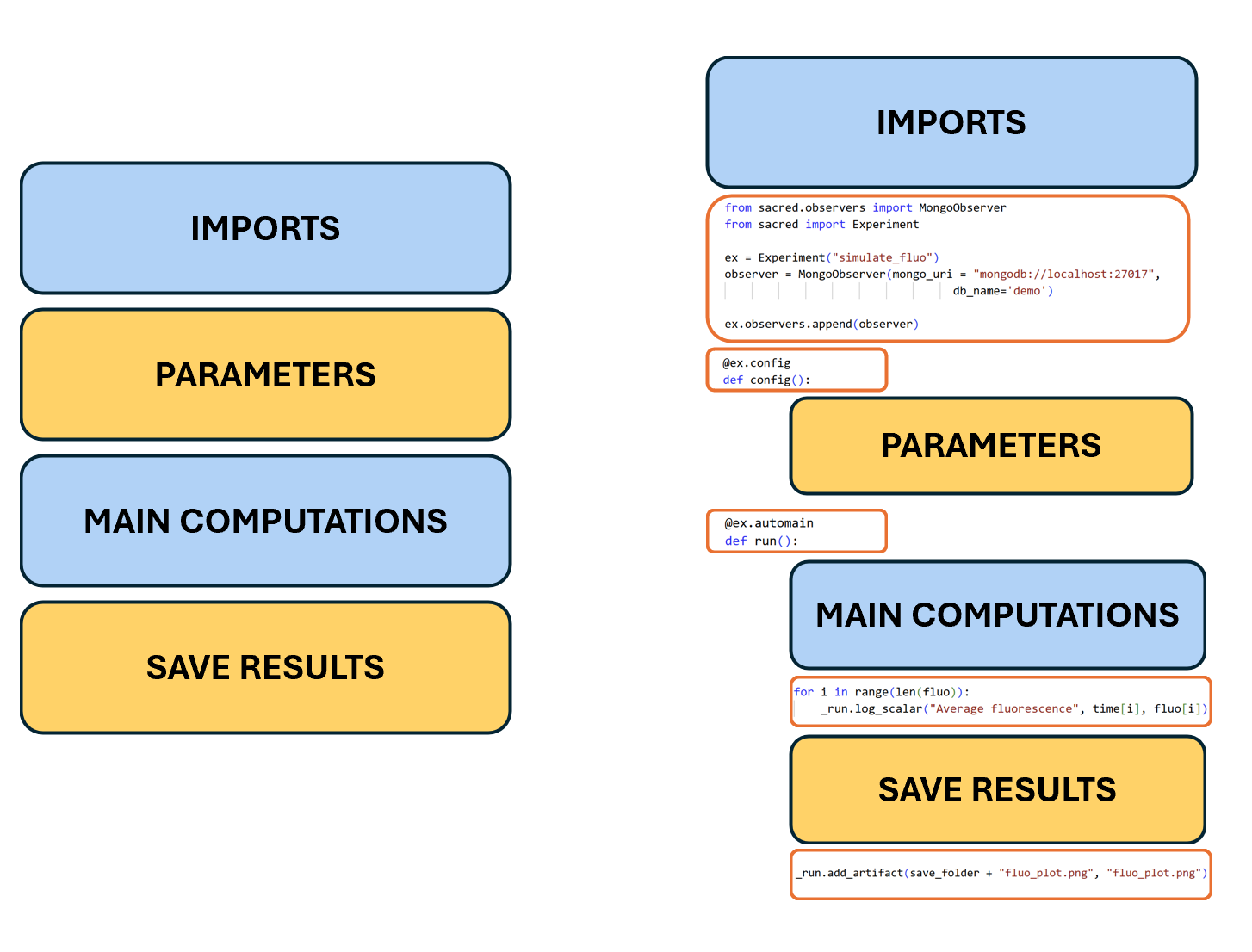
A tiny cheat‑sheet for the core pieces you’ll see reflected in Altar:
| Concept | Sacred term | What it means |
|---|---|---|
| Config | config |
Parameters for a run (hyperparameters, settings). Dict‑like, serializable. |
| Run | run |
One execution: status, start/stop, resources, seed. |
| Artifacts | artifacts |
Files saved with the run (images, small CSVs, etc.). |
| Logs | captured_out / logging |
Stdout/stderr captured; helpful for debugging and provenance. |
| Info | info |
Free‑form metadata you attach (notes, computed stats, tags). |
| Commands | @ex.command |
Named entry points (e.g., train, evaluate). |
| Observer | Observer |
Backend that stores runs (e.g., MongoObserver for MongoDB). |
| Capture | @capture |
Inject config values into functions without threading args everywhere. |
Handy snippets (from this repo’s examples)
Below are live excerpts pulled from the example_sacred folder in this repository, so you can copy/paste or run them directly.
Minimal experiment (example_sacred/experiment.py)
import numpy as np
import matplotlib.pyplot as plt


## Sacred specific imports

# Experiment: Central class of Sacred framework, specifyes config, main function, observers, etc.
from sacred import Experiment

# Ingredient: Tasks that can be reused across experiments
from ingredient_save_folder import save_folder, make_folder

# Observer: Used to log experiment results to different backends
from sacred.observers import MongoObserver


ex = Experiment('test_experiment', ingredients=[save_folder])

ex.observers.append(MongoObserver(url='mongodb://localhost:27017/',
                                  db_name='test_db'))


@ex.config
def my_config():
    A = 10
    tau = 0.5
    B = 3
    N = 100
    t_max = 1.0


@ex.capture
def get_exponential(A, tau, B, N, t_max):
    x = np.linspace(0, t_max, N)
    y = A * np.exp(-tau * x) + B
    return x, y

@ex.automain
def my_main(_run, _log):

    save_folder =  make_folder(_run, root = "")

    x, y = get_exponential()

    plt.plot(x, y)
    plt.xlabel('time')
    plt.ylabel('y')
    plt.savefig(save_folder + '/output_plot.png')
    _log.info("Saved output plot to {}".format(save_folder + '/output_plot.png'))

    ex.add_artifact(save_folder + '/output_plot.png', name='output_plot.png')

    for i in range(len(y)):
        _run.log_scalar("y", y[i], x[i])
Multiple runs launcher (example_sacred/run_multi_exp.py)
from experiment import ex


for tau in [0.1, 0.5, 1.0, 5, 10.0]:
    config_updates = {
        "A": 10,
        "tau": tau,
        "B": 0,
        "N": 100,
        "t_max": 1
    }


    print(f"Running Sacred experiment for {config_updates}")
    ex.run(config_updates=config_updates)


for i, N in enumerate([5, 10, 100, 1000]):
    config_updates = {
        "A": 10-i,
        "tau": tau,
        "B": 10+i,
        "N": N,
        "t_max": 1
    }


    print(f"Running Sacred experiment for {config_updates}")
    ex.run(config_updates=config_updates)


for i, t_max in enumerate([0.5, 1, 3]):
    config_updates = {
        "A": 10-i,
        "tau": tau,
        "B": 20+i,
        "N": 100,
        "t_max": t_max
    }


    print(f"Running Sacred experiment for {config_updates}")
    ex.run(config_updates=config_updates)
Tip: these scripts illustrate config definitions, commands, observers, logging metrics with _run.log_scalar, adding artifacts, and structuring experiments for repeatable runs.